
In Cubit Estimating 9, you now have the ability to copy items containing references and maintain their relationships relative to where you will be pasting them.
If the items you copy from the Estimate, Rate or Calculation Sheets include references, when you Paste with relative references, the references are maintained within the pasted selection instead of referring to the original reference source from where the items were copied.
- When pasting relative references, you can use the Paste special from the context menu, and click Paste with relative references.
- You can use the shortcut Ctrl + Shift + V to paste relative references.
- You can use shortcut Shift + F4 to copy the sheet contents of the above item with relative references.
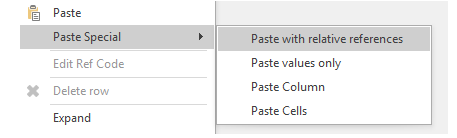
Fig.1 Paste with relative references
Note: This feature currently works within the same job/price list only.
Paste with relative references
Relative referencing can be used within the Estimate, Rate and Calculation sheets in a job and within the Estimate and Calculation sheets in a Pricelist. When pasted, the reference will be linked to the copied item instead of the source which it was copied from.
1. Open a job that contains existing references or create a new job.
2. Copy the items by pressing Ctrl + C or right-click and select Copy.

Fig.2 Copy an item with referencing
Note: If one of your items are referencing a cell outside the selection being pasted with relative references, you will be alerted with the following window and the references will be pasted as values only
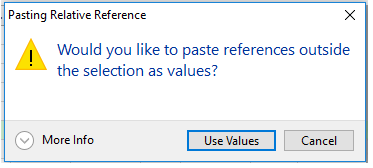
Fig.3 Paste references outside selection alert
3. Go to the sheet where you want to paste the items and right-click anywhere on the row you want your items inserted.
4. From the drop-down menu, click Paste Special, then Paste with Relative References or press Ctrl+Shift+V.

Fig.4 Paste Special, Paste with relative references
The pasted item will now have referencing local to its new location.

Fig.5 Pasted item referencing locally
Paste with relative references from the above cell
By pressing Shift + F4, the cell above will be copied down with relative referencing.

Fig.6 Shift + F4 copies down from the cell above

Fig.7 The result of Shift + F4
Comments
"Note: If one of your items are referencing a cell outside the selection being pasted with relative references, you will be alerted with the following window and the references will be pasted as values only" - what does this mean? I always get this message and I have no idea what to do to stop getting it
Hi Kevin,
That message means you’re copying or pasting an item that’s linked (referenced) to something outside what you’re copying, like a formula or reference pointing to a cell in another trade or item that is outside your selected copied items.
Because Cubit can’t keep that link when you paste, it changes those references into fixed numbers (values) instead.
You’ll keep seeing the message whenever you paste something that has formulas or references pointing to cells not included in what you’re copying.
To stop getting it:
Include the referenced items in your selection when you copy,
Or remove the cell references (replace them with actual numbers) before copying.
I will also raise a support ticket for you, so that if you like, we can review your Cubit data and provide a more specific solution to prevent this alert from recurring.
Please sign in to leave a comment.