
Besides the default columns available in the Estimate, Calculation and Rate sheets, other columns can be added to assist you with your estimating.
To add columns, please do the following:
1. Open a Cubit Estimating job
2. Right-mouse click on the Description heading of either your Estimate Sheet, Calculation Sheet or Rate Sheet and select "Column Chooser"
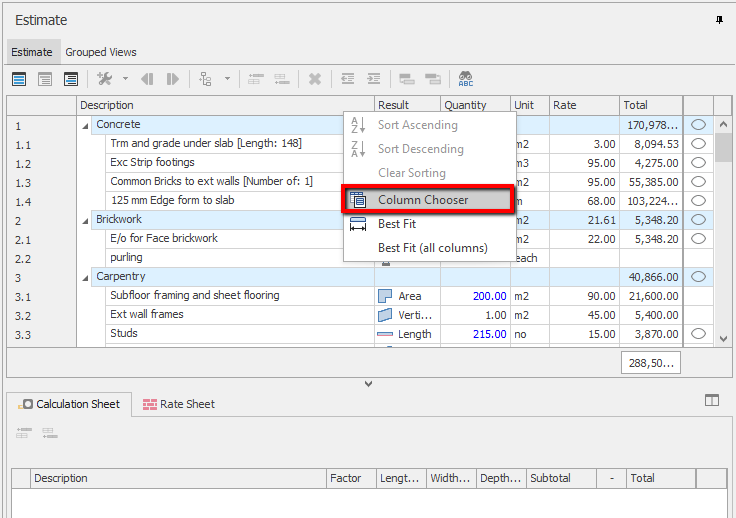
Fig 1. Column Chooser
3. A Customization window will appear listing the available columns. Double-click on the column name you wish to add
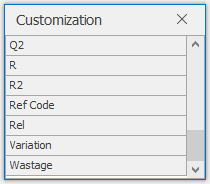
Fig 2. Customization columns
Comments
Can you show me some examples using Q, Q2,R, R2 columns in performing take off
Hi Elaine,
It seems all Codes in Cubit Estimating have already been assigned, e.g. Q, Q2, R, R2 & etc. What do the Q or R codes stand for? We would like to be able to assign the Ref codes ourselves, for example L for a labour item or M for material; OR maybe pb1, pb2, pb3 for 6mm, 10mm, 13mm plasterboard respectively. How can we do this because in the codes there are already assigned?
Hi Sossy,
Thanks for raising a question, I've raised this request as a support ticket for yourself and I'll reach out to you directly to discuss this further with you.
Thanks Reece.
Looking forward to your further advice.
Please sign in to leave a comment.